


Pi-Hole (Network-wide Ad Blocker and DNS Sinkhole)
Taking control of network traffic for enhanced privacy and a cleaner browsing experience.
1. Project Overview & Problem Solved
I set up Pi-hole on a Raspberry Pi to act as a DNS server and network-wide ad blocker for my home network. The goal was to block ads and tracking domains across every device on the network without needing browser extensions or per-app settings. It also meant moving away from my ISP's default DNS servers.
2. Key Technologies & Tools Used
• Hardware: Raspberry Pi Zero W, SD Card
• Operating System: Raspberry Pi OS Lite
• Core Software: Pi-hole (DNS sinkhole, DHCP server, web interface)
• Network Protocols: DNS (Domain Name System), DHCP (Dynamic Host Configuration Protocol)
• Router: Vodafone Gigabox (acting as the internet gateway)
• Command Line Tools: ssh, nano, ip a, ping, ipconfig /all (on Windows PC)
• Configuration Files: /etc/dhcpcd.conf (for static IP), Pi-hole's web admin interface
3. Goals & Features Implemented
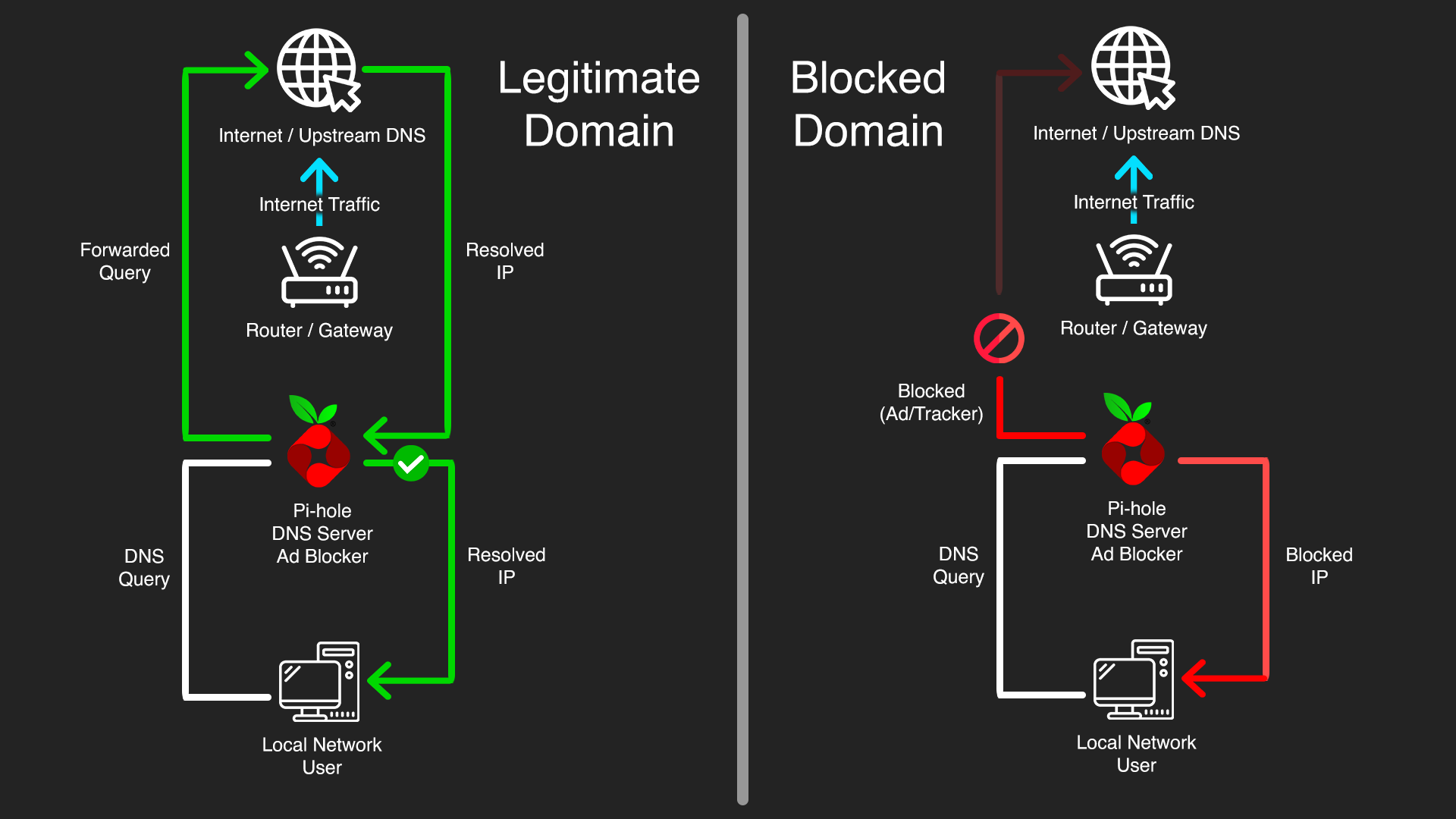
• Network-Wide Ad & Tracker Blocking: Pi-hole acts as a DNS sinkhole, preventing devices from resolving domains associated with ads, malware, and tracking, significantly enhancing privacy and reducing attack vectors from malicious ads.
• Centralized DNS Control: All DNS queries on the network flow through Pi-hole, giving full visibility into what domains devices are trying to reach. Nothing can quietly bypass it since Pi-hole controls DNS assignment through DHCP.
• Enhanced Privacy: Blocking tracking domains reduces how much data advertisers and third parties can collect about browsing habits across the network.
• Malware & Phishing Protection: Pi-hole's blocklists include known malicious domains, adding a lightweight but useful layer of protection against malware and phishing at the network level before traffic even reaches a device.
• Static IP for Reliability: Assigned a permanent static IP to the Pi-hole so it's always reachable as a critical network service. A DNS server with a changing IP would break the whole network.
• DHCP Server Takeover for Enforcement: By having Pi-hole manage DHCP, it ensures that all devices automatically receive the Pi-hole's IP as their DNS server, enforcing network-wide filtering without manual configuration on each client. This prevents devices from using hardcoded or secondary DNS servers that bypass Pi-hole.
4. Technical Implementation & Workflow
The project began with the installation of Raspberry Pi OS Lite on the Raspberry Pi. A crucial initial step was to configure a static IP address for the Pi-hole device. This involved editing the /etc/dhcpcd.conf file to assign a permanent IP (e.g, 192.168.1.10), define the network subnet (/24), set the router's IP as the gateway (192.168.1.1), and specify upstream DNS servers (e.g, 1.1.1.1 1.0.0.1) for the Pi-hole itself to use. This configuration was then verified by rebooting the Pi-hole and checking its IP using ip a, ensuring it showed valid_lft forever.
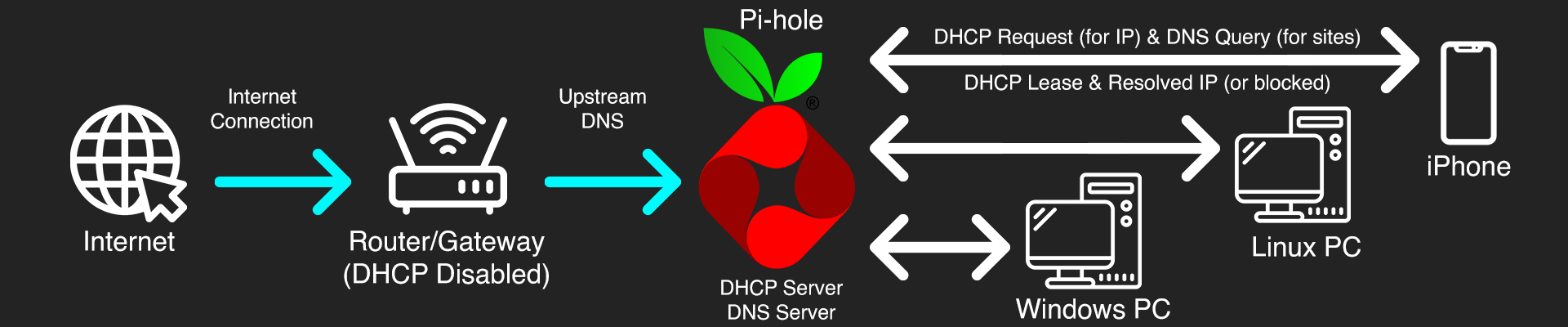
Following the static IP setup, the Pi-hole software was installed. A key decision point was determining the DHCP server role. Given that the Vodafone Gigabox router did not allow custom DNS server configuration via its DHCP settings, the strategy shifted to making Pi-hole the primary DHCP server for the entire network.
The next phase involved configuring the Pi-hole's built-in DHCP server via its web admin interface. This included enabling the DHCP service, defining an IP address range for client devices (e.g, 192.168.1.50 to 192.168.1.250), setting the router's IP as the network gateway, and crucially, setting the Pi-hole's own static IP address as the DNS server for all clients.
The final critical step was to disable the DHCP server on the Vodafone Gigabox router. This was done by logging into the router's admin interface and navigating to its LAN or DHCP settings to turn off the DHCP service. The network was then carefully rebooted: first the Vodafone Gigabox, then the Pi-hole, and finally all client devices (PCs, phones, etc.) to ensure they obtained new IP leases and DNS configurations from the Pi-hole.
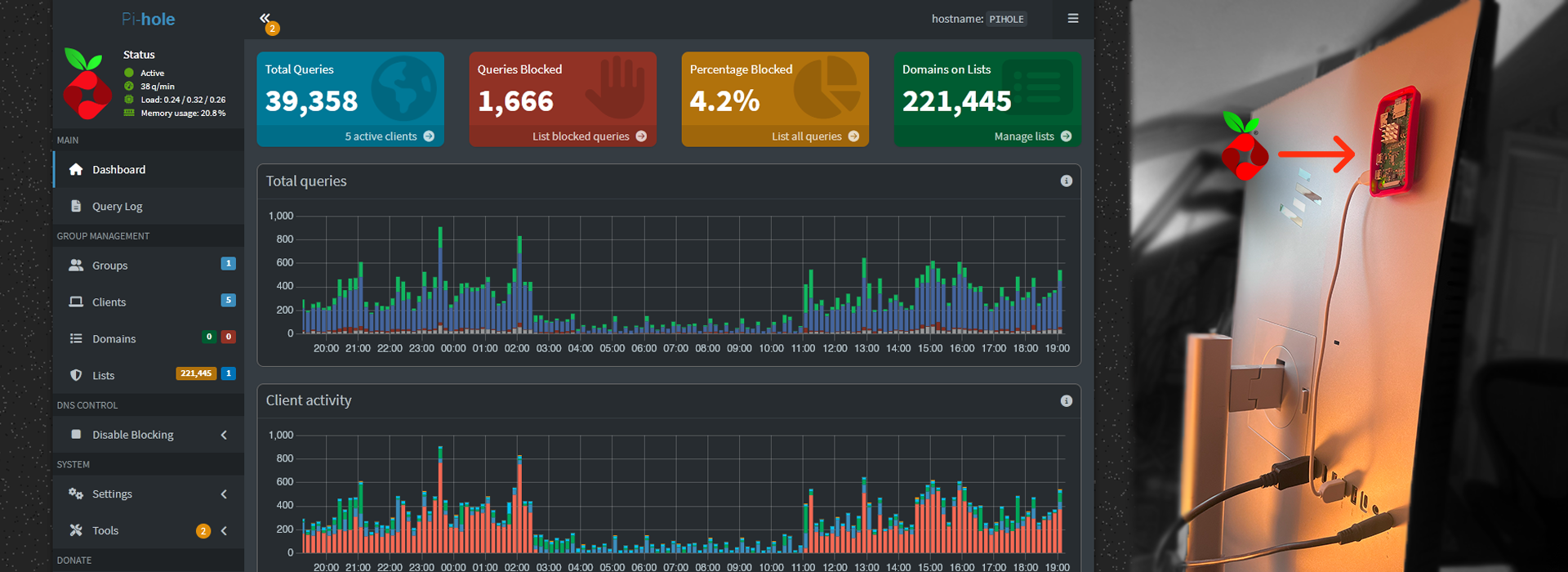
Verification involved checking client devices (e.g, PC via ipconfig /all, iPhone via Wi-Fi settings) to confirm that both their DHCP Server and DNS Server entries pointed to the Pi-hole's static IP. The Pi-hole's web admin Query Log was monitored to observe incoming DNS requests from various client devices and confirm successful ad/tracker blocking.

5. Challenges Faced & Solutions
Challenge 1: Pi-hole's IP Address Not Sticking as Static
Initially, the Raspberry Pi would lose its assigned static IP address after a reboot, reverting to a dynamic IP. This made it unreliable as a central network service. The dhcpcd.conf file was found to be blank or incorrectly configured.
Solution: Meticulously re-edited /etc/dhcpcd.conf via SSH using nano, ensuring the interface, static ip_address, static routers (gateway), and static domain_name_servers entries were correctly added and uncommented. Repeated reboots and ip a verification confirmed the static IP was permanently assigned.
Challenge 2: Router Restrictions on DHCP DNS Configuration
The Vodafone Gigabox router did not provide an option to change the DNS server IP addresses that it hands out to clients via DHCP. This prevented the simpler "router handles DHCP, Pi-hole handles DNS" setup.
Solution: Pivoted to the more advanced "Pi-hole handles DHCP and DNS" method. This required completely disabling the router's DHCP server and enabling Pi-hole's DHCP server to take over network IP assignments.
Challenge 3: Temporary Internet Loss During DHCP Transition
Upon disabling the router's DHCP and rebooting, the network would lose internet connectivity, indicating that Pi-hole's DHCP server wasn't immediately taking over or was misconfigured.
Solution: Ensured Pi-hole's static IP was rock-solid and its DHCP settings were correctly configured (IP range, gateway, DNS server pointing to itself). The critical step was performing a specific reboot sequence: first the router (after disabling its DHCP), then the Pi-hole, and finally all client devices. This ensured a clean transition of DHCP authority to the Pi-hole.
6. Key Learnings & Skills Gained
• Deep Understanding of DHCP & DNS: Gained practical, hands-on experience with how DHCP servers assign IP addresses and network configurations, and how DNS servers resolve domain names, including the critical role of primary/secondary DNS.
• Linux System Administration: Enhanced proficiency in managing a headless Linux server via command-line, including editing critical network configuration files (dhcpcd.conf), managing services (systemctl), and using diagnostic tools (ip a, ping).
• Router Configuration: Learned to navigate and configure advanced settings on a consumer-grade router, specifically disabling DHCP to allow an external server (Pi-hole) to take over.
• Pi-hole Administration: Gained expertise in setting up, configuring, and verifying Pi-hole's core functionalities, including its DHCP server and monitoring the query log for network-wide ad-blocking effectiveness.
• Importance of Static IPs: Solidified the understanding of why static IP addresses are essential for reliable network services like DNS and DHCP servers.
• Systematic Problem-Solving: Applied a methodical approach to diagnose and resolve persistent network issues, emphasizing the importance of verifying each step before proceeding.
• Network Security Fundamentals: Reinforced concepts of controlling network traffic at the DNS level to enhance privacy and mitigate threats from malicious domains.
7. Future Enhancements
• Custom Blocklists & Whitelists: Continuously refine and add custom blocklists for specific ad/tracking domains or whitelist domains that are inadvertently blocked.
• Automated Pi-hole Updates: Implement a scrip for automated, regular updates of Pi-hole software and blocklists to maintain optimal performance and security.