


Secure Self-Hosted File Storage & Access
Building a robust and secure personal cloud solution.
1. Project Overview & Problem Solved
This project focuses on designing and implementing a secure, self-hosted file storage and access solution using a Raspberry Pi. The primary goal was to gain full control over personal data, moving away from reliance on third-party cloud providers, while ensuring robust security measures are in place.
The problem addressed is the inherent privacy and security concerns associated with storing sensitive data on public cloud platforms. By self-hosting, this project mitigates risks such as unauthorized data access by third parties, data breaches affecting cloud providers, and potential service interruptions. It provides a highly controlled environment for personal files, accessible securely from within the local network and, for remote access, exclusively via a VPN connection to the home network.

2. Key Technologies & Tools Used
• Hardware: Raspberry Pi (e.g., 4B 4GB), External Hard Drive (HDD), SD Card, Powered USB Hub (for HDD power)
• Operating System: Raspberry Pi OS Lite (64-bit)
• Containerization: Docker, Docker Compose
• File Access Services: Samba (SMB/CIFS), File Browser (Docker container)
• Reverse Proxy & SSL Management: Nginx Proxy Manager (NPM - Docker Container)
• Network Security: UFW (Uncomplicated Firewall)
• Secure Communication: Let's Encrypt (SSL/TLS Certificates)
• Remote Access: SSH (Secure Shell), WireGuard VPN
• Domain Resolution (Public & Local): DuckDNS (for public domain resolution), Pi-hole (for local DNS override)
• Command Line Tools: ufw, docker, docker-compose, ssh, nano, chown, chmod
3. Cybersecurity Goals & Features Implemented
• Reduced Attack Surface: Implemented UFW with a default deny policy, explicitly opening only essential ports (SSH, Samba, Nginx Proxy Manager's internal ports, and **File Browser's direct local access port 8081**). This minimizes points of entry for attackers, as no services are directly exposed to the public internet.
• Strong Authentication: Utilized SSH key-based authentication with passphrases for remote administration, eliminating password vulnerabilities. Samba and File Browser use dedicated user accounts with strong, unique passwords.
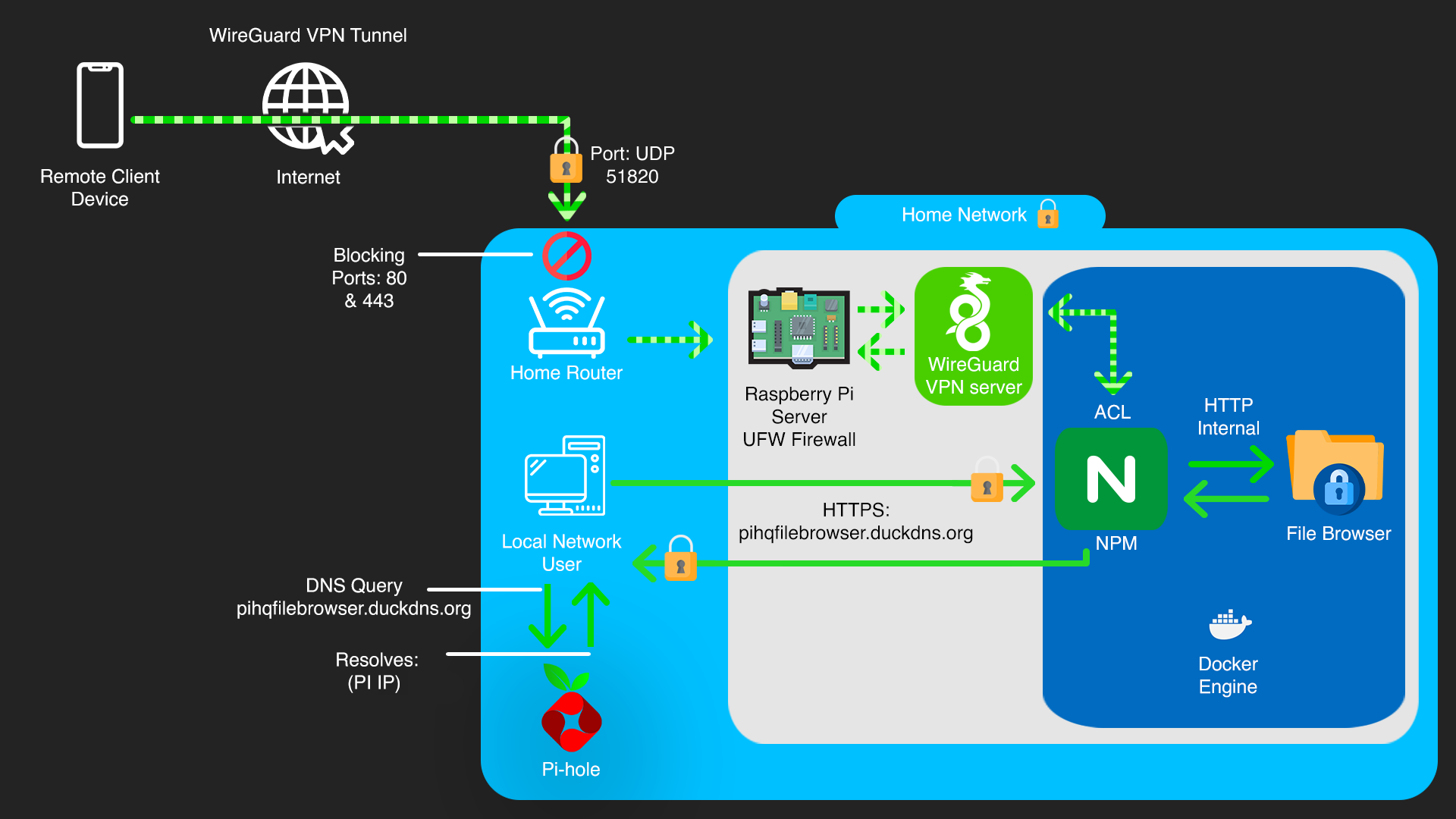
• Data in Transit Encryption (Local & VPN): Leveraged Nginx Proxy Manager to provide HTTPS encryption for File Browser access within the local network using Let's Encrypt SSL/TLS certificates. All remote traffic is encrypted by the VPN tunnel before reaching the local network, ensuring end-to-end security.
• Application Isolation: Deployed File Browser and Nginx Proxy Manager within Docker containers to isolate them from the host OS. This limits the blast radius of a potential application vulnerability, preventing it from affecting the entire system.
• Principle of Least Privilege: Configured file system permissions (chmod 775, chown pihq:pihq) for the attached HDD, ensuring that only the dedicated Samba user has appropriate access, preventing unauthorized data manipulation.
• Secure Remote Access (via VPN Only): External access to File Browser is exclusively achieved by first connecting to the home network via a WireGuard VPN. This ensures File Browser's internal port and Nginx Proxy Manager's local HTTPS port are never directly exposed to the public internet, routing all remote traffic through an encrypted VPN tunnel.
• Access Control Lists (ACLs) in NPM: Configured Nginx Proxy Manager with an Access List to restrict access to the File Browser proxy host only to IP addresses within the VPN's assigned subnet. This provides an additional layer of granular access control, ensuring that even if the NPM interface were somehow exposed, only VPN-connected clients could reach the File Browser.
• SMB1 Protocol Disabled: Ensured the insecure SMBv1 protocol is disabled, forcing the use of more secure SMB versions.
4. Technical Implementation & Workflow
The project commenced with the initial setup of Raspberry Pi OS Lite on the device, followed by the configuration of a static IP address for reliable network presence. The external HDD was then connected via a powered USB hub and configured with appropriate ownership and permissions (chown -R pihq:pihq /mnt/PIHQ_Storage, chmod -R 775 /mnt/PIHQ_Storage) to ensure secure data handling.
Docker and Docker Compose were installed to facilitate containerization. File Browser was deployed as a Docker container, making it accessible on an internal port (e.g., 8081). For network security, UFW was configured to deny incoming by default, with explicit rules to allow SSH, Samba traffic, and File Browser's direct local access port 8081. Nginx Proxy Manager (NPM) was deployed as a Docker container, providing a web-based interface for managing reverse proxy configurations and SSL certificates. SSH key-based authentication was set up for secure remote administration.
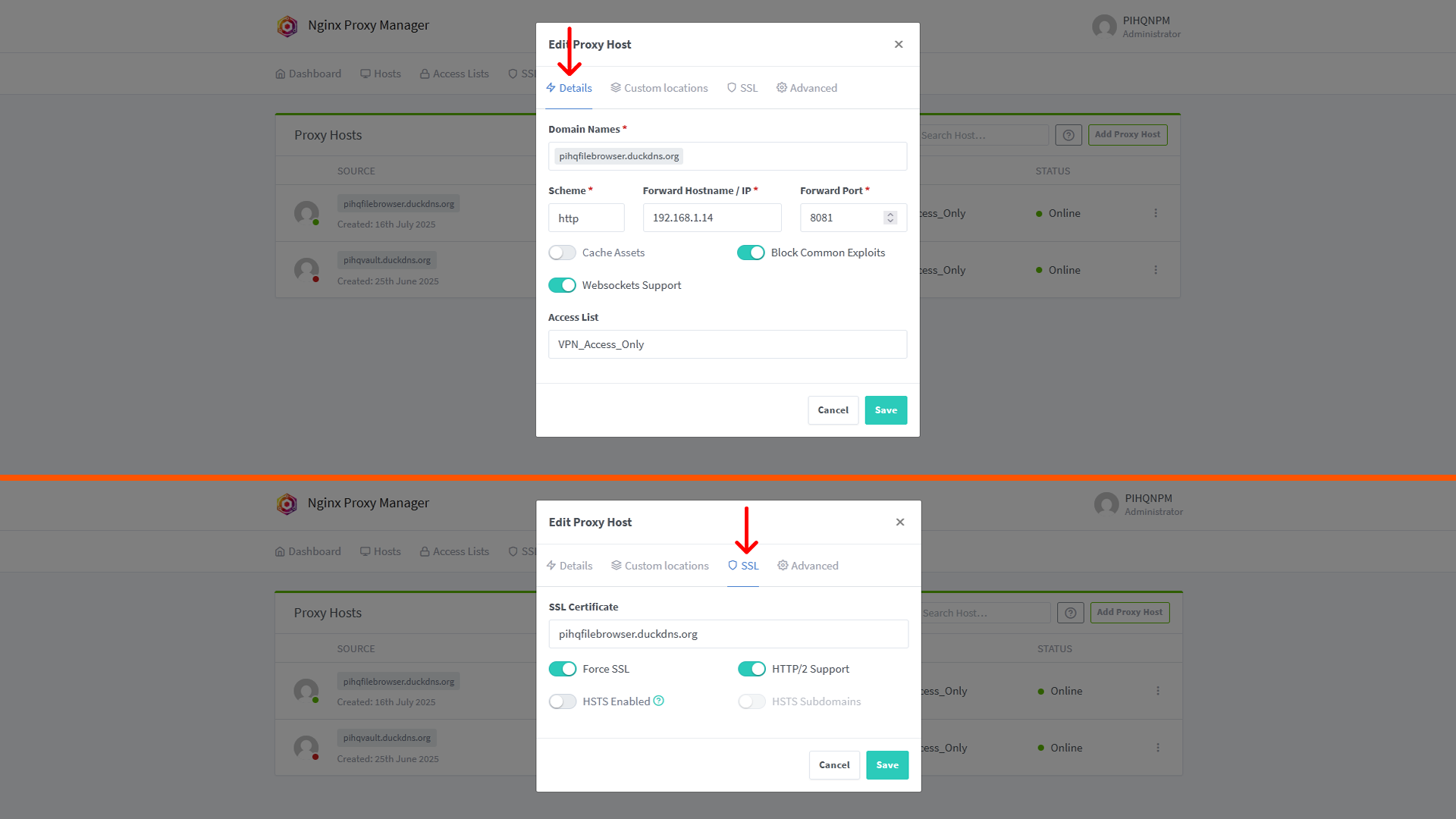
Within the NPM web interface, a new Proxy Host was created for File Browser. This involved specifying the domain pihqfilebrowser.duckdns.org and pointing it to the internal IP and port of the File Browser container. NPM's integrated Let's Encrypt functionality was used to obtain and automatically renew SSL/TLS certificates for pihqfilebrowser.duckdns.org via the DNS-01 challenge method, leveraging DuckDNS API credentials. Local DNS records for pihqfilebrowser.duckdns.org were added to Pi-hole, ensuring that devices on the local network resolve this domain to the Raspberry Pi's private IP address. An Access List was applied to this proxy host within NPM, restricting access to only the IP range assigned to VPN clients, ensuring that only devices connected via the WireGuard VPN could reach the File Browser web interface. No router port forwarding was configured for HTTP/HTTPS traffic to the public internet; external checks (e.g, via canyouseeme.org) confirmed that ports 80 and 443 remained closed to the internet. All external access relies on a prior VPN connection to the home network.

5. Challenges Faced & Solutions
Challenge 1: Hard Drive Spin-Down Configuration
Ensuring the external HDD would spin down when idle to conserve power and potentially extend its lifespan proved challenging due to various background processes and USB-to-SATA bridge behaviour.
Solution: Explored and configured hd-idle for power management. This involved meticulous debugging of hd-idle service configurations and monitoring disk activity with iotop to identify and mitigate any processes preventing spin-down. (Note: This specific challenge highlights persistence in troubleshooting complex Linux system behaviours.)
Challenge 2: Securely Accessing Web Services Remotely
Providing secure access to File Browser from outside the local network required a robust and controlled method without directly exposing internal services to the public internet.
Solution: Implemented Nginx Proxy Manager to provide local HTTPS access for File Browser. For external access, a WireGuard VPN connection to the home network is required. This ensures File Browser's internal port is never directly exposed to the internet, and all remote traffic is encrypted via the VPN tunnel.
6. Key Learnings & Skills Gained
- Network Security: Practical application of firewall rules (UFW), secure network segmentation, and understanding of network traffic flow within a local and VPN-connected environment.
- Access Control: Implementation of SSH key-based authentication, robust user account management, precise file/directory permissions (chmod, chown), and configuration of Access Control Lists (ACLs) within Nginx Proxy Manager to enforce the principle of least privilege.
- Application Security: Secure deployment of web applications (File Browser) behind a reverse proxy (Nginx Proxy Manager), enabling HTTPS/SSL for encrypted communication, and understanding secure configuration practices via a GUI.
- Vulnerability Management: Recognizing the critical importance of regular system and software updates to patch known vulnerabilities and maintain system integrity.
- Risk Assessment & Mitigation: Identifying potential threats and attack vectors to a self-hosted system and implementing layered security measures to reduce those risks effectively.
- Linux System Administration: Proficiency in managing a Linux-based server environment, including command-line operations, service management (systemd), file system navigation, and script execution.
- Container Security: Utilizing Docker for application isolation, understanding container networking, and recognizing the security benefits of containerization. Experience with Dockerized applications like Nginx Proxy Manager.
- Problem Solving & Debugging: The iterative process of diagnosing, troubleshooting, and resolving complex configuration and service issues (e.g, with hd-idle or Docker container issues), demonstrating strong analytical skills.
- VPN Integration: Understanding how to securely integrate a self-hosted service with a VPN for remote access, enhancing overall security posture by avoiding public exposure.
- Local DNS Management: Practical experience configuring and managing local DNS records (e.g, in Pi-hole) to ensure proper hostname resolution for internal services.
7. Future Enhancements
• Implement Fail2Ban: Deploy Fail2Ban to automatically block IP addresses that show signs of malicious activity, such as repeated failed login attempts to SSH, Samba, or Nginx Proxy Manager's web interface.
• Automated Encrypted Backups: Establish a robust, automated, and encrypted backup solution for the data on PIHQ_Storage to an off-site location or cloud storage, protecting against data loss from hardware failure or ransomware.