


Secure Self-Hosted Obsidian Sync with Syncthing
Building a private, peer to peer note synchronization solution.
1. Project Overview & Problem Solved
This project details the design and implementation of a secure, self-hosted synchronization solution for Obsidian notes using Syncthing. The primary objective was to move away from reliance on third-party cloud services for sensitive personal notes, ensuring complete data privacy and control.
The problem addressed is the inherent privacy risk of storing personal knowledge bases (like Obsidian vaults) on commercial cloud platforms, where data might be subject to third-party access, data breaches, or vendor policy changes. By leveraging Syncthing, this project establishes a decentralized, encrypted, peer-to-peer sync network across multiple devices, keeping all data local and under direct user control. Remote access is exclusively secured via a VPN, ensuring the note vault is never directly exposed to the public internet.
2. Key Technologies & Tools Used
• Hardware: Raspberry Pi, External Hard Drive (HDD), SD Card, Multiple Client Devices (Linux PC, MacBook, iPhone)
• Operating System: Raspberry Pi OS Lite (64-bit), Linux (EndeavourOS), macOS, iOS
• Synchronization Software: Syncthing (on Raspberry Pi, Linux PC, macOS), Möbius Sync (iOS client for Syncthing)
• Note-Taking Application: Obsidian
• Network Security: UFW (Uncomplicated Firewall)
• Remote Access: SSH (Secure Shell), WireGuard VPN
• Command Line Tools: ssh, nano, ip a, ping, ipconfig /all (on Windows PC)
3. Cybersecurity Goals & Features Implemented
• Data Sovereignty: Ensured all Obsidian notes reside exclusively on user-controlled hardware (Raspberry Pi, PCs, phone), eliminating reliance on third-party cloud servers and maintaining full ownership of personal data.
• End-to-End Encryption: All data transfers between Syncthing nodes are encrypted using TLS, protecting notes from eavesdropping during synchronization.
• Reduced Attack Surface: Implemented UFW with a default deny policy on the Raspberry Pi, explicitly opening only essential ports for Syncthing (discovery and data transfer) and SSH. No Syncthing services are directly exposed to the public internet.
• Strong Authentication: Utilized SSH key-based authentication with passphrases for remote administration of the Raspberry Pi. Syncthing's GUI is protected with a strong username and password.
• Secure Remote Access (via VPN Only): External access to the Syncthing network is exclusively achieved by first connecting to the home network via a WireGuard VPN. This ensures all remote sync traffic passes through an encrypted VPN tunnel, preventing direct exposure of Syncthing ports to the internet.
• Peer-to-Peer Redundancy: The decentralized nature of Syncthing means that data is replicated across all connected devices. If one device is offline, others can still sync, providing a resilient and redundant synchronization network.
• Version Control: While Syncthing isn't a version control system like Git, it can be configured to keep old versions of files, offering a basic form of recovery for accidental changes or deletions.
4. Technical Implementation & Workflow
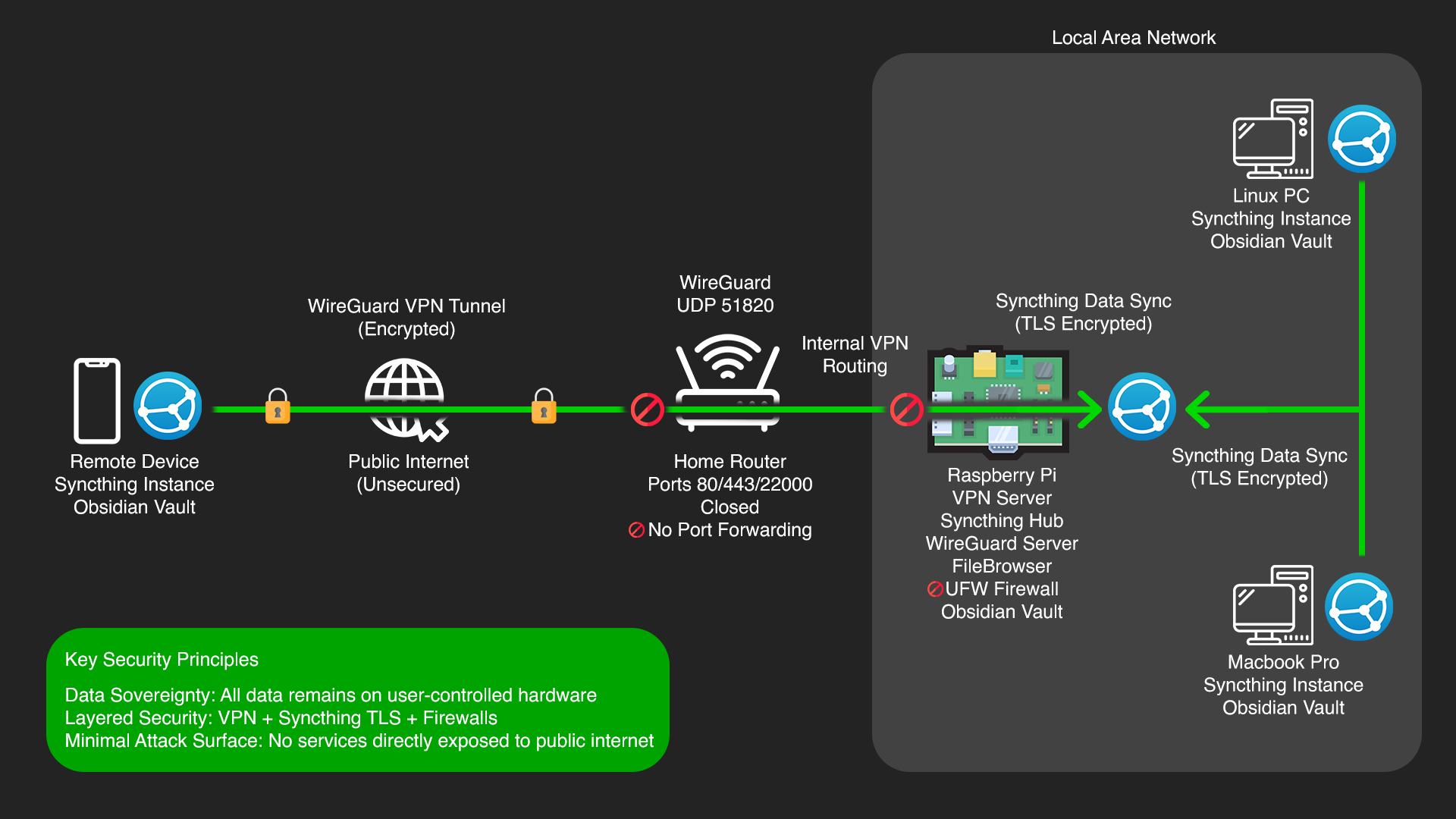
Syncthing runs as a systemd service on the Pi, keeping it persistent in the background. First step was locking down UFW with a default deny policy, then opening only what was needed. SSH, TCP 22000 for Syncthing data transfer and UDP 22000 for device discovery.
For initial GUI access I used SSH tunnelling (ssh -L 8384:localhost:8384) to reach the web interface securely, set a strong username and password, then began pairing devices by manually exchanging Device IDs. The Obsidian vault folder was shared across the Pi, PC and phone.
On iOS, standard Syncthing clients don't work reliably due to Apple's background process restrictions, so I used Möbius Sync instead. It's not perfectly real-time but keeps the vault up to date with background sync enabled.
Remote access is handled entirely through WireGuard — connecting to the VPN first means Syncthing behaves as if everything is on the local network. No ports are forwarded or publicly exposed at any point.
Finally, automated encrypted backups of the vault run separately on the Pi — an important distinction since Syncthing is a sync tool, not a backup. Without this, an accidental deletion would propagate across every device.

5. Challenges Faced & Solutions
Challenge 1: iOS Background Synchronization Limitations
A significant challenge was achieving seamless, real-time background synchronization on iOS devices due to Apple's strict app sandboxing and background process management policies. Many Syncthing clients struggle with continuous background operation.
Solution: Utilized Möbius Sync, a third-party Syncthing client for iOS, which offers the best available background sync capabilities. While not perfectly real-time like desktop clients, enabling its background sync features and occasionally opening the app manually ensures the vault remains largely up-to-date. This pragmatic approach balances security with usability on a mobile platform.
Challenge 2: Initial Syncthing Device Discovery and Connection
Connecting multiple Syncthing instances for the first time, especially across different operating systems and network segments, can be tricky. Issues with firewall rules, device IDs, and network discovery often arise.
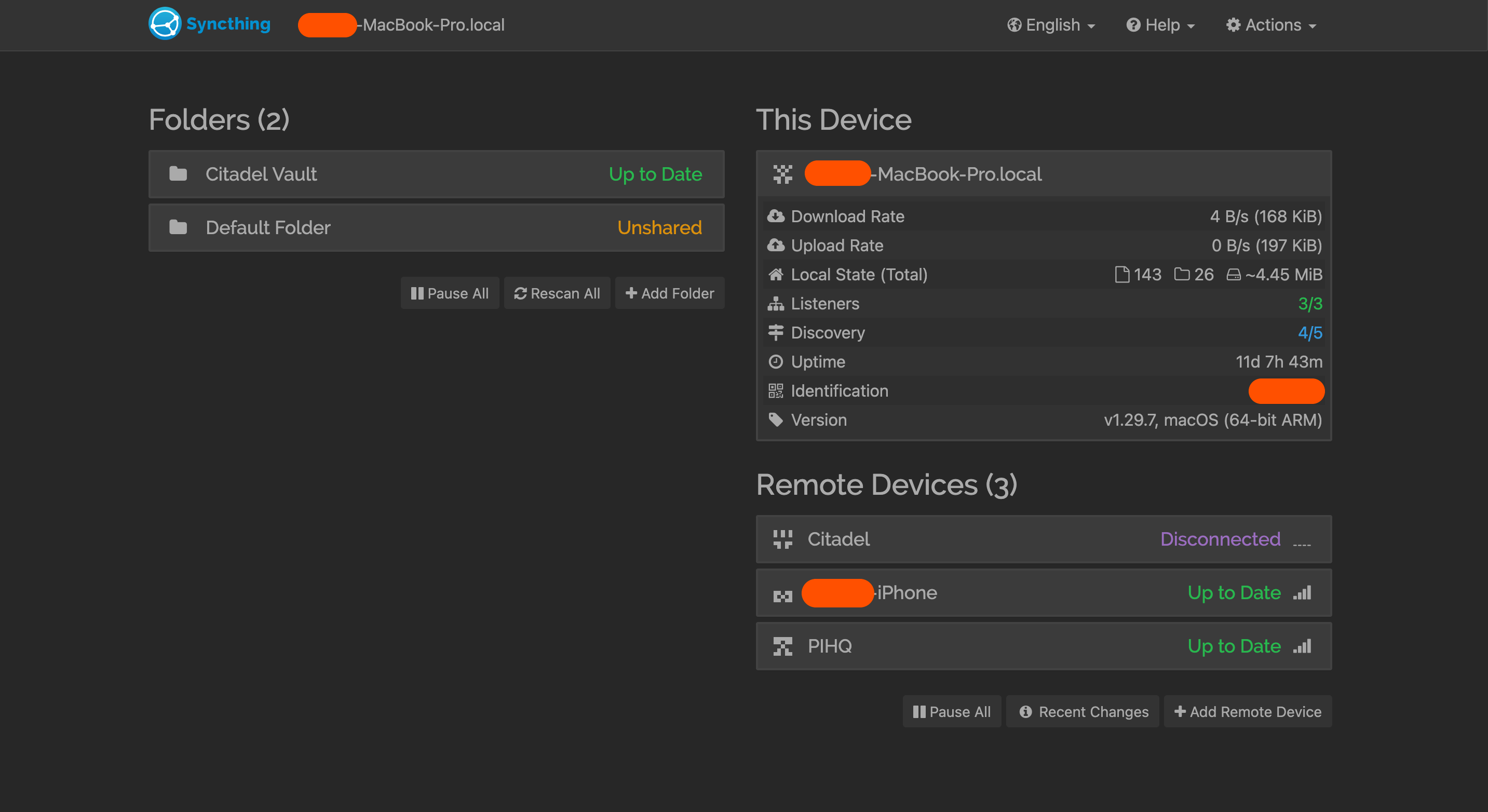
Solution: Systematically added each device by manually exchanging Device IDs in the Syncthing Web UI. Ensured UFW on the Raspberry Pi explicitly allowed Syncthing's discovery (UDP 22000) and data transfer (TCP 22000) ports. For initial GUI access, SSH tunneling (ssh -L 8384:localhost:8384) was used to bypass potential firewall issues before securing the GUI for direct local network access.
Challenge 3: Ensuring Data Integrity and Preventing Accidental Deletion
While Syncthing provides synchronization, it is not a backup solution. Accidental deletion of a file on one device would propagate across the entire network.
Solution: Implemented a separate, automated backup strategy for the Obsidian vault on the Raspberry Pi. This involves regular, encrypted backups to an external drive or a dedicated cloud storage service, providing a robust recovery point independent of the live synchronization. This highlights the critical distinction between sync and backup.
6. Key Learnings & Skills Gained
• Data Privacy & Sovereignty: Deep understanding of the importance of controlling personal data and practical implementation of self-hosted solutions to achieve this.
• Peer-to-Peer Networking: Hands-on experience with decentralized file synchronization (Syncthing), including device discovery, folder sharing, and conflict management in a peer-to-peer environment.
• Secure Remote Access: Proficiency in integrating self-hosted services with a WireGuard VPN for encrypted and controlled remote access, avoiding direct public internet exposure.
• Cross-Platform System Administration: Experience deploying and managing services across diverse operating systems (Raspberry Pi OS, Linux, macOS, iOS).
• Linux System Administration: Enhanced skills in command-line operations, systemd service management, user/group permissions, and basic networking on a Raspberry Pi.
• Troubleshooting & Debugging: Developed strong problem-solving skills by diagnosing and resolving synchronization issues, network connectivity problems, and iOS-specific limitations.
• Obsidian Ecosystem: Gained deeper insight into Obsidian's vault structure and how external tools can integrate for enhanced functionality and security.
• Troubleshooting & Debugging: Developed strong problem-solving skills by diagnosing and resolving synchronization issues, network connectivity problems, and iOS-specific limitations.
• Risk Assessment & Mitigation: Identified and mitigated risks associated with cloud reliance, accidental data loss, and unauthorized access through layered security measures.
• Documentation: The iterative process of documenting all steps, configurations, and troubleshooting processes, essential for reproducibility and knowledge transfer.
7. Future Enhancements
• Containerize Syncthing: Explore running Syncthing itself within a Docker container on the Raspberry Pi for further application isolation and simplified management, aligning with modern DevOps practices.