


Self Hosted Password Manager (Vaultwarden)
A hands-on cybersecurity project demonstrating secure infrastructure deployment.
1. Project Overview & Problem Solved
This project involved setting up a personal, self-hosted password manager solution on a Raspberry Pi using Vaultwarden, a lightweight Bitwarden-compatible server, secured by Nginx Proxy Manager. This setup provides a robust and private alternative to cloud-based password management services, primarily accessible from the local network or securely via a Virtual Private Network (VPN) connection.
In an era of increasing data breaches, privacy concerns, and reliance on third-party services, the need for enhanced control over personal data is paramount. This project directly addresses the risks associated with storing sensitive credentials on external platforms by establishing a locally controlled, encrypted, and highly available password management system, significantly reducing the attack surface and enhancing personal data sovereignty.

2. Key Technologies & Tools Used
• Hardware: Raspberry Pi (e.g., 4B 4GB), SD Card
• Operating System: Raspberry Pi OS Lite (64-bit)
• Containerization: Docker, Docker Compose
• Password Manager: Vaultwarden (Docker Image)
• Reverse Proxy: Nginx Proxy Manager (Docker Image)
• Database: MariaDB (Docker Image)
• Remote Access: SSH (Secure Shell)
• Networking: Custom Docker Bridge Network, HTTPS/SSL (Let's Encrypt), Dynamic DNS (DuckDNS)
• Protocols: HTTP, HTTPS, TCP, WebSockets
• Command Line Tools: nano, docker, docker compose, ufw
3. Cybersecurity Goals & Features Implemented
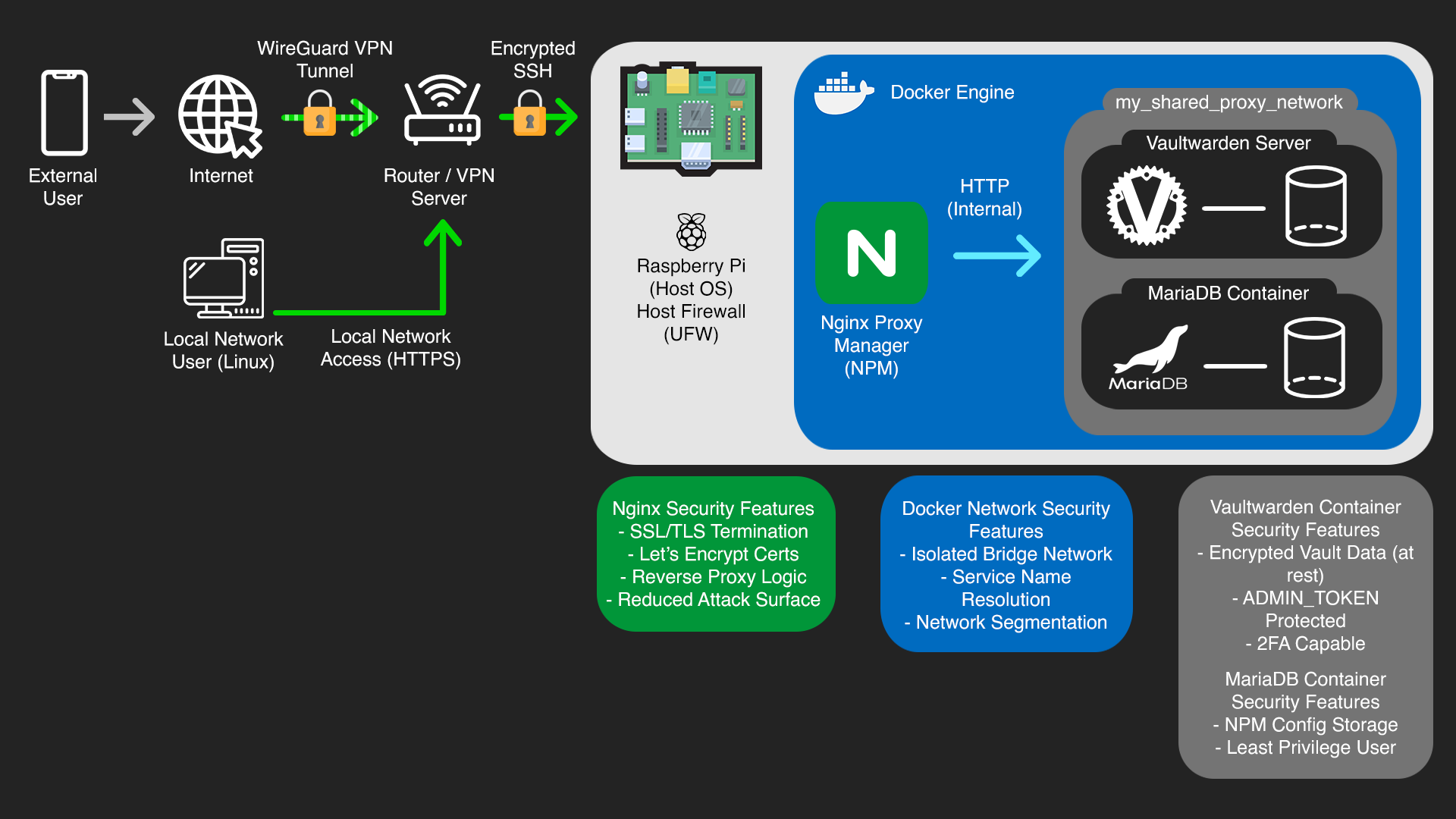
• End-to-End Encryption (HTTPS/SSL/TLS): Implemented robust HTTPS encryption using Nginx Proxy Manager and free Let's Encrypt SSL certificates. This secures all traffic between the user's browser and the password manager, preventing eavesdropping and data tampering.
• Reduced Attack Surface: Configured Nginx Proxy Manager to handle HTTPS for pihqvault.duckdns.org for controlled access, ensuring direct internet exposure of the password manager service is prevented. The setup is designed for local network and VPN access only, significantly limiting potential entry points for attackers.
• Container Isolation: Utilized Docker for containerization, isolating Vaultwarden, Nginx Proxy Manager, and MariaDB into separate, sandboxed environments. This enhances system integrity and limits the impact of a potential compromise to a single container.
• Internal Network Segmentation: Established a dedicated, isolated Docker network (my_shared_proxy_network) for secure internal communication between Nginx Proxy Manager and Vaultwarden. This prevents unauthorized access from other networks on the host and ensures sensitive internal traffic remains private.
• Secure Administration: Protected the Vaultwarden administration panel with a strong, secret ADMIN_TOKEN, preventing unauthorized server management and configuration changes.
• Data Persistence & Integrity: Configured Docker volumes for persistent storage of Vaultwarden's encrypted vault data and Nginx Proxy Manager's configurations. This ensures data integrity across container restarts and provides a foundation for robust backup strategies.
• Credential Management: Emphasized the use of strong, unique passwords for all service accounts (MariaDB, Vaultwarden master password) and recommended Two-Factor Authentication for the user's Vaultwarden account, promoting fundamental security hygiene.
4. Technical Implementation & Workflow
The setup began with configuring docker-compose.yml files for each service, defining images, environment variables, volumes, and network connections. Initial access and management of the Raspberry Pi were conducted via encrypted SSH connections from a Linux-based main PC, ensuring secure remote administration throughout the project.
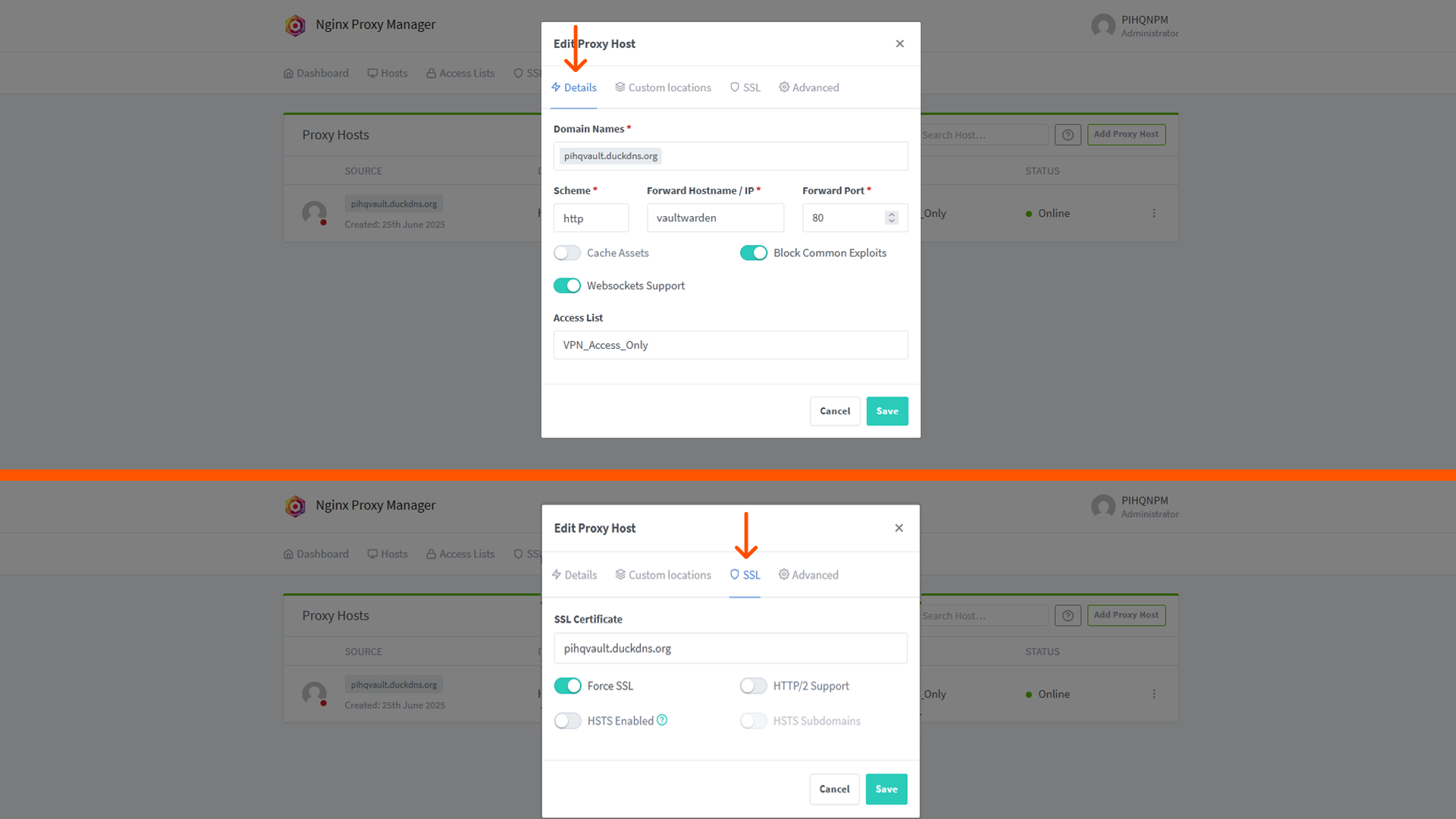
A crucial step involved resolving database connectivity issues for Nginx Proxy Manager by configuring MariaDB's authentication plugin to mysql_native_password and ensuring correct password handling. Subsequently, a shared external Docker network was created and utilized, enabling seamless and secure internal communication between the Nginx Proxy Manager and Vaultwarden containers using their service names. This removed the need for exposing internal ports directly to the host network for inter-container communication. Finally, a Proxy Host was configured in Nginx Proxy Manager to serve pihqvault.duckdns.org (used for both local and VPN-tunneled access), directing traffic to the internal Vaultwarden container via its service name (vaultwarden) and internal port (80), with automated SSL certificate issuance and renewal handled by Let's Encrypt.

5. Challenges Faced & Solutions
Challenge 1: Database Connection for Nginx Proxy Manager (NPM)
Initially faced issues with Nginx Proxy Manager failing to connect to its MariaDB database, indicated by container logs showing authentication errors. This was traced to a mismatch in the default authentication plugins used by newer MariaDB versions versus what NPM expected.
Solution: Researched MariaDB's authentication methods and identified that newer versions default to caching_sha2_password, while NPM expected mysql_native_password. The docker-compose.yml was updated to explicitly configure MariaDB to use mysql_native_password for the npm user, resolving the connectivity issue.
Challenge 2: Incorrect Reverse Proxy Configuration for Internal Access
After establishing network connectivity, initial attempts to configure the Nginx Proxy Manager Proxy Host for Vaultwarden involved using the Raspberry Pi's host IP address and Vaultwarden's host-published port (8080), resulting in connection timeouts or "504 Gateway Timeout" errors.
Solution: The Proxy Host configuration in Nginx Proxy Manager was corrected to leverage Docker's internal networking. The "Forward Hostname / IP" was set to the Vaultwarden container's service name (vaultwarden), and the "Forward Port" was set to Vaultwarden's internal listening port (80). This allowed NPM to correctly route traffic directly to the Vaultwarden container within the shared Docker network
6. Key Learnings & Skills Gained
• Container Orchestration: Gained practical experience in deploying, managing, and troubleshooting multiservice applications using Docker and Docker Compose, including defining services, volumes, and networks.
• Reverse Proxying & SSL/TLS: Developed hands-on skills in configuring Nginx Proxy Manager for secure web service exposure, including automated SSL certificate acquisition and renewal with Let's Encrypt, and effective traffic routing.
• Network Segmentation: Mastered advanced Docker networking concepts by implementing a custom, isolated bridge network for secure inter-container communication, demonstrating an understanding of network security principles.
• Database Management: Acquired direct experience in configuring and troubleshooting MariaDB database connectivity, specifically resolving authentication plugin issues and ensuring secure database interactions for applications.
• Security Best Practices: Applied core cybersecurity principles such as reducing attack surface, implementing controlled access (local network and VPN), and enforcing strong credential management for all components of the system.
• Troubleshooting: Enhanced systematic problem-solving and debugging capabilities by diagnosing and resolving complex issues across Docker, networking, and application layers.
• Command Line Proficiency: Increased comfort and efficiency with Linux command-line interface (CLI) tools for system administration, Docker management, and network diagnostics on a Raspberry Pi.
• Secure Remote Administration: Practiced secure remote access and management of Linux systems using encrypted SSH connections, understanding the importance of protecting administrative interfaces.
7. Future Enhancements
• Implement an automated backup script for Vaultwarden data to an external drive or cloud storage, ensuring data resilience and disaster recovery capabilities.
• Configure SMTP settings for Vaultwarden to enable password hint emails and other critical notifications, enhancing user experience and security alerts.
• Integrate Fail2Ban on the Raspberry Pi to automatically ban malicious IP addresses attempting brute-force attacks on services like SSH or Nginx Proxy Manager, adding an active intrusion prevention layer.